Solitaire
- 4.7
- Rating
- 5.00M
- Installs
- Free
- Price
 Analysis by App-foxy
I approached Solitaire as the kind of game I could open for a few quiet minutes rather than as a large, feature-heavy entertainment app. That turned out to be the right way to judge it. This is a classic card game from LinkDesks - Jewel Games Star, offered free for Everyone, with a straightforward purpose: give you a familiar solo card challenge that is easy to start and simple to understand.
My main question was not whether it could replace every card game on a phone. It cannot, and it does not need to. The more useful question is whether its particular version of Solitaire fits the way you want to play. If you like a calm, repeatable puzzle with rules you already know, it is an appealing choice. If you want a campaign, a social table, a deep collection system, or constant novelty, you should look at a different kind of card game.
What I considered before recommending it
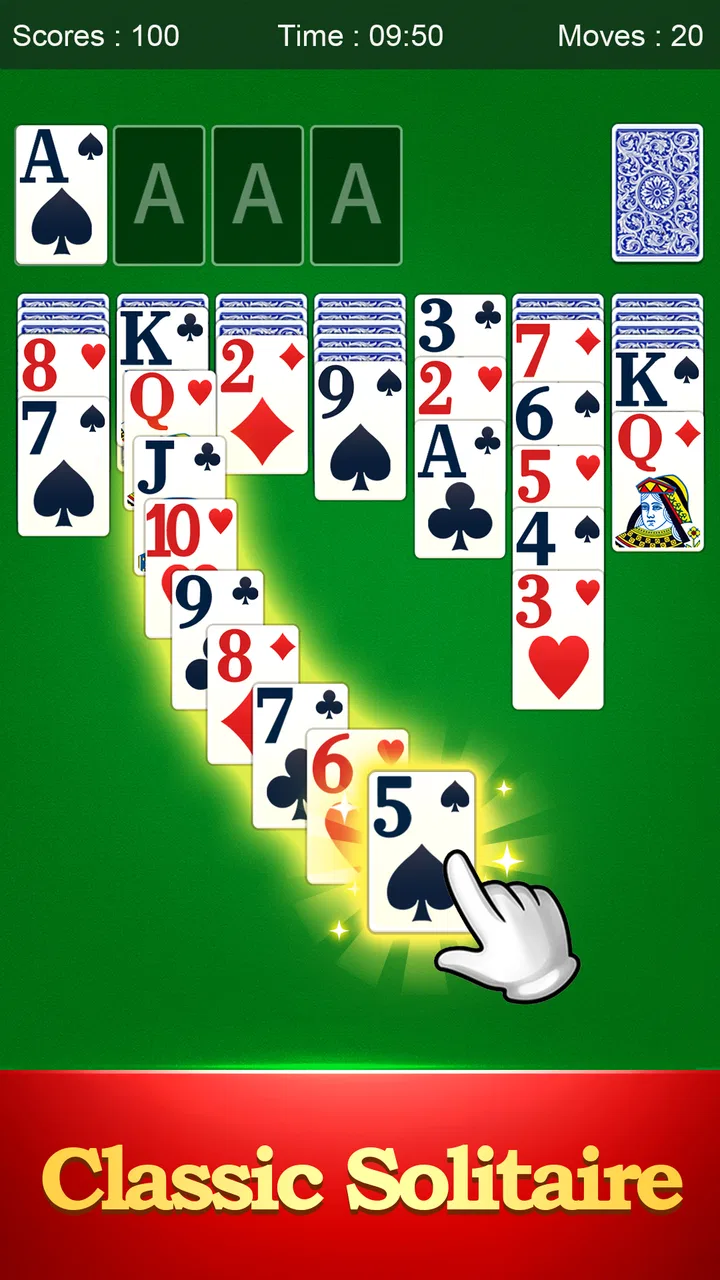
The first decision point is the learning curve. Solitaire works because most people can recognize the basic rhythm immediately: arrange cards, uncover hidden possibilities, and avoid closing off the moves you may need later. I found that this version respects that familiarity instead of burying it under a complicated presentation. You can get into a round quickly, which matters when the game is being used during a short break.
You May Also Like

 Blood Strike: 2.5 Anniversary
Blood Strike’s Loadouts Turn Every Drop Into a Tactical Gamble
A close look at Blood Strike’s custom loadouts: how fast access to signature weapons reshapes its battle royale rhythm, rewards preparation, and narrows the gap between fights.

 Pandora - Music & Podcasts
Pandora’s Music Is Easy to Start, but Harder to Recover
Pandora’s strength is its low-effort path from a seed to a station. Its weak spot is how much confidence it asks you to place in connection, setup, and quiet recovery.

 8 Ball Pool
 Is Built on Rivalries, Rematches, and Routine
A close look at the rivalries, rematches, shared routines, and unanswered safety questions that turn a quick pool match into a persistent mobile community.

 Samsung Music
’s Quiet Strength Is Playing What You Already Own
Its reach comes less from spectacle than from dependable access to a personal library. That simplicity is both the app’s strongest retention engine and its ceiling.

 AccuWeather: Weather Radar
AccuWeather Review: A Quick, Clear Forecast for Everyday Decisions
For everyday plans, the best forecast is the one you can understand quickly. AccuWeather makes rain timing, radar, and local conditions easy to act on, with a few trade-offs.

 Hill Climb Racing
Why Hill Climb Racing Still Turns Crashes Into One More Run
A tiny car, a bumpy hill and one more upgrade: Hill Climb Racing keeps resurfacing because its simple chaos makes every near-miss feel personal.
More From Our News Desk



The second point is the type of attention it demands. This is not a reflex game. It rewards looking ahead, noticing which move opens the most useful card, and resisting the temptation to play the first legal move you see. That makes it a pleasant option when I want something interactive but not noisy or stressful. It also means that people seeking fast action may find the pace too restrained.
I also judged it as a pocket activity rather than a one-time novelty. A Solitaire game needs to remain comfortable after several rounds. The familiar rules help here, because the challenge comes from the arrangement of the cards rather than from learning a new system every time. The store summary presents it as a way to enjoy classic Solitaire and exercise your brain, and that description matches my experience more closely than a promise of dramatic variety would.
One practical detail is compatibility. The current release is version 5.7.1 and requires Android 6.0 or later. That makes it suitable for many older Android devices, although anyone using an especially old phone should check the operating system before planning around it. The game has been available since March 8, 2021, so it is not a brand-new experiment; it has had time to settle into its role as a conventional Solitaire option.
The small choices that make a round more enjoyable
The best way I found to play is to treat each move as a decision about future access, not just immediate progress. When several cards can be moved, I first look for the move that exposes a hidden card or creates a useful empty space. A move that looks productive because it places a card neatly can still be poor if it blocks a longer sequence. This habit makes the game feel more like a compact logic exercise than simple card sorting.
I also recommend avoiding automatic, impatient play. In a short session, it is tempting to tap through every obvious move and hope the next card solves the problem. I had better results when I paused after opening a column and reconsidered the whole layout. That is a useful distinction for new players: the game is easy to operate, but good decisions are not always obvious.
Another practical use is as a reset between demanding tasks. I would not describe it as a substitute for focused study, but one deliberate round can provide a defined break because it has a clear beginning and end. Unlike scrolling through an endless feed, the activity asks me to make choices and then gives me a natural stopping point when the round finishes or reaches an impasse.
For that reason, I think it works particularly well during a commute, while waiting for an appointment, or after dinner when I want a quiet screen activity. The important trade-off is that the same simplicity that makes it accessible can make it feel repetitive if you need a constant stream of new goals.
Where this version is strongest
Its biggest strength is focus. The app is centered on Solitaire rather than trying to become a general-purpose card hub. I appreciate that because the familiar structure is the attraction. I can return after a few days without relearning controls, characters, currencies, or a long sequence of objectives.
The game also suits players who want a gentle mental challenge. I found the useful tension comes from planning several moves ahead while accepting that not every round will unfold perfectly. That balance is more satisfying than a purely random time filler, but it remains approachable enough for someone who has never spent much time with digital card games.
Its broad reception supports that impression: it holds a 4.8 average from around 55 thousand ratings, and it has passed 5 million installs. Those figures do not guarantee that every player will enjoy the presentation or pacing, but they do suggest that the basic approach has connected with a substantial audience.
The age classification of Everyone is another reason I would consider it for a shared household device. The rules are easy to explain, and the game does not depend on mature themes or complicated narrative context. I would still let a younger player explore the controls with an adult nearby, simply because the strategic decisions are more rewarding when someone explains why a move may be useful rather than merely showing where to tap.
There is also value in its low commitment. Because it is free, I can try it without treating the download as a major purchase decision. That is especially helpful for someone comparing several Solitaire apps: install it, play enough rounds to judge the feel, and remove it if the experience does not suit you. The lack of a purchase price lowers the cost of testing the category.
How it compares with other card-game choices
Compared with a traditional physical deck, the phone version is more convenient. I do not need a table, a clear surface, or time to gather the cards after a round. The trade-off is tactile: anyone who enjoys shuffling, dealing, and physically moving cards may find a screen less satisfying. For that player, a real deck is not an inferior alternative; it offers a different kind of relaxation.
Compared with multiplayer card games, this is much more private and self-paced. There is no need to wait for opponents or keep up with a table. That makes it a better fit for a quiet break, but a worse fit for someone whose main pleasure comes from bluffing, conversation, competition, or shared play.
Compared with collectible card games, Solitaire is far less demanding in terms of long-term commitment. You are not building a deck, learning a changing metagame, or managing a growing collection. I see that as a major advantage for casual players. On the other hand, collectors may quickly feel that there is not enough progression or personalization to hold their attention.
Brain-training apps can offer a wider menu of exercises, while this game concentrates on one recognizable puzzle. If I want variety across memory, numbers, language, and logic, I would choose the broader app category. If I want to improve at one card format through repeated play, the narrower focus is more comfortable and less distracting.
Even among Solitaire apps, the right alternative depends on what you value. Some players will prefer a more decorative presentation, a larger selection of formats, or stronger social features. I would choose this one when the priority is a familiar, uncluttered card routine. I would switch categories when the goal changes from relaxing with a puzzle to competing, collecting, or pursuing a structured progression.
Limitations worth considering before you install
The simplicity can become a limitation. After repeated sessions, the central loop may feel predictable, especially if you already know Solitaire well. I enjoyed the consistency, but I would not recommend it to someone who needs a fresh challenge every few minutes. A broader card collection or a puzzle app with multiple modes would probably provide more long-term variety.
The game also asks for patience. A poor sequence can leave you with fewer useful options, and not every round feels equally satisfying. Players who dislike restarting or who expect every session to end in a win may become frustrated. I found that the right mindset is to treat unsuccessful rounds as part of the puzzle rather than as a failure of the app.
There is a difference between “brain training” as a casual mental workout and formal learning. The game encourages planning and attention, but I would not use it as evidence of measurable cognitive improvement. Its benefit is more modest and realistic: it gives your mind something structured to work through instead of offering completely passive entertainment.
Another limitation is fit rather than quality. If you usually play with friends, the solitary format may feel empty. If you want a story, characters, or a strong sense of progression, classic Solitaire will seem bare. Those are not defects in the rules; they are signs that you may be looking for a different product.
What switching to it is really like
The cost of trying it is low because the game is free, but there is still a small switching cost in changing your habits. If you already use another Solitaire app, you may need a few rounds to decide whether this version’s feel is preferable. I suggest judging it on three specific questions: can you start a round without friction, do the card movements feel comfortable on your screen, and does the level of presentation keep your attention without getting in the way?
If the answer is yes, moving over is easy because the underlying game is familiar. You do not need to learn a new genre or rebuild a collection. Your main adjustment is simply accepting that this is a focused Solitaire experience rather than a broader entertainment package.
If you are replacing a multiplayer card game, the change is more significant. You will gain privacy and control over the pace, but lose the social element. I would make that switch for solo breaks, travel, or quiet evenings, not for gatherings where interaction is the point.
Likewise, moving from a physical deck means trading touch for convenience. I would keep the physical option if dealing cards is part of your relaxation. I would use this app when I want the same general challenge without carrying anything or finding a suitable surface.
Who should choose it
I recommend it to someone who wants a free, familiar card game that can be played in short sessions and understood almost immediately. It is especially suitable for casual players, people returning to Solitaire after a long break, and anyone who prefers a calm puzzle to a competitive or story-driven game.
I would also suggest it to Android users with an older compatible device who want a current version without needing the newest operating system. The developer is LinkDesks - Jewel Games Star, and the app’s established release history makes it feel like a practical everyday download rather than a temporary novelty.
I would skip it if your priority is multiplayer interaction, elaborate progression, collectible depth, or a large range of card variants. In those cases, another card-game category will serve you better. I would also skip it if you already know that repeated classic Solitaire rounds lose their appeal quickly; no amount of convenience can solve a mismatch with the core loop.
For everyone else, my advice is to begin with a few unhurried rounds rather than judging it after one unlucky layout. Pay attention to whether planning the next move feels relaxing or tedious. That reaction tells you more than the download itself, because the app’s value comes from the rhythm it creates over time.
My recommendation after playing
Solitaire succeeds by keeping its promise narrow. It gives me a familiar card puzzle, a gentle reason to concentrate, and an easy way to fill a short pause. It does not try to compete with social card tables, collectible games, or large puzzle suites, and I think that restraint is its main appeal.
There are limits: the format can become repetitive, unsuccessful rounds may test your patience, and players looking for social or narrative features should choose another option. Still, for a free Everyone-rated game with a clear purpose, broad adoption, and a strong average rating, I consider it an easy recommendation for the right audience.
My final advice is simple: choose this game for calm, familiar solo play, not for endless variety. If that is what you want from a card app, it is worth trying. If you need competition, collection, or constant novelty, save your time and look beyond classic Solitaire.
FAQs for Solitaire
01Is Solitaire free to play?
Yes, the Solitaire app is free to download and play on both Android and iOS devices. However, it may offer in-app purchases or ad-free versions for users who wish to enhance their experience. These optional purchases can include additional themes, card designs, or hints.
02Does Solitaire require an internet connection?
No, Solitaire does not require an internet connection to play. It is an offline game, allowing users to enjoy it anytime, anywhere without needing Wi-Fi or mobile data. However, accessing certain features, like leaderboards or updates, might require connectivity.
03What are the system requirements for Solitaire?
The Solitaire app generally has minimal system requirements, making it compatible with most Android and iOS devices. Typically, it requires Android 4.1 or later and iOS 9.0 or later. It's a lightweight application, so storage space should not be a major concern for most users.
04Can I customize the appearance of the cards and background?
Yes, the Solitaire app often allows users to customize the game’s appearance. You can choose from a variety of card designs and backgrounds. Some themes might be free, while others could be part of a premium package or require in-app purchases to unlock.
05Is there a way to track my progress or compete with others?
Many Solitaire apps come with built-in statistics and leaderboards to track your progress and compete with friends or global players. You can see your win rate, best times, and other metrics. Connecting with social media or creating an account might be necessary to access these features.
Pros
- Easy to learn and play for all ages.
- No internet connection required.
- Customizable card designs.
- Helps improve concentration.
- Lightweight
- doesn’t drain battery.
Cons
- Limited game modes available.
- Ads can be intrusive at times.
- Not suitable for multiplayer fun.
- Graphics are quite basic.
- No in-depth tutorials for beginners.

Solitaire
Gallery